
Free Tools to Support Reading and Writing
Enhancements for Microsoft Word
WordTalk

(Word 97, Word 2000, Word XP, Word 2003, Word 2007, Word 2010)
Voice Comments in Microsoft Word
(Avaiable in Word 2003 and earlier versions)

 Download Instructions for Installing Voice Comments in MS Word 2003
Download Instructions for Using Voice Comments in MS Word 2003
Download Instructions for Adding Voice Comments (and Auto-Summarize) to Toolbar in MS Word 2007)
Online Instructions for Adding Voice Comments to MS Word 2007 Documents (from Tech Republic)
NOTE: Voice Comments do NOT work in MS Word running in Windows 7
Download instructions for Using the Sound Recorder in Windows 7 to Add Voice Comments to Word 2007
Auto Summarize in Microsoft Word
(available in Word 2007 and earlier)

Easliy summarize a MS Word 2007 Document (Online Tutorial)
Autosummarize a document in Office Word 2007 (Online Tutorial with Helpful Video)
Download Instructions for Adding Autosummarize (and Voice Comments) to MS Word 2007
Equation Editor in Microsoft Word
(available from Word 97 onward)
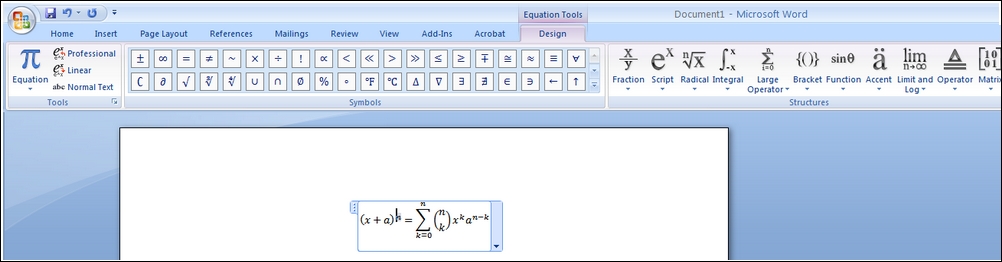
 Download Instructions for adding Equation Editor to MS Word 2007
 Download or Open Quick Guide for Equation Editor in Word 2003
Microsoft Mathematics Add-in for Microsoft Word and OneNote
(available from Word 2007 onward)

Perform mathematical operations on expressions or equations in MS Word 2007 or 2010
Graphs can be inserted directly into documents
Click HERE for more details and a helpful video
Download Mathematics Add-in here (Installation is extremely easy)

Comments (0)
You don't have permission to comment on this page.